Loading…
ExpertSDR3
ExpertSDR3 minimum system requirements
CPU: four physical cores, Intel Core i3/i5 or higher, or comparable AMD.
RAM: 8 GB.
Windows graphics: DirectX 11.0, feature level 11_0, shader model 5.0.
Linux x86_64 graphics: OpenGL 3.3.
Raspberry Pi 5 graphics: OpenGL ES 3.0.
macOS graphics: Metal on a Mac with macOS 13.0 or later.
Video memory: at least 256 MB.
Windows prerequisite: latest Microsoft Visual C++ Redistributable.
Network: 100 Mbit/s direct LAN; WLAN is not recommended for stability.
Minimum GPU families: Windows — NVIDIA GeForce 400, AMD Radeon HD 5000 or Intel HD Graphics 4000 and newer; Linux — NVIDIA GeForce 400, AMD/ATI Radeon HD 7700 or Intel HD Graphics 4000 and newer.
If ExpertSDR3 fails to start on Windows, reinstall Visual C++ Redistributable as Administrator.
Supported operating systems
Windows 10 (1809 or later) x86_64 and Windows 11 x86_64.
Ubuntu 22.04 x86_64; Ubuntu 24.04 x86_64 and ARM64.
Raspberry Pi 5: Raspberry Pi OS 64-bit, AppImage package. This build is still in development and may have rough edges.
macOS 13.0 or later (including macOS 15): x86_64, x86_64h and arm64.
ExpertSDR3 is tested on current versions of Windows 11, Ubuntu 24.04 and macOS 15 on ARM.
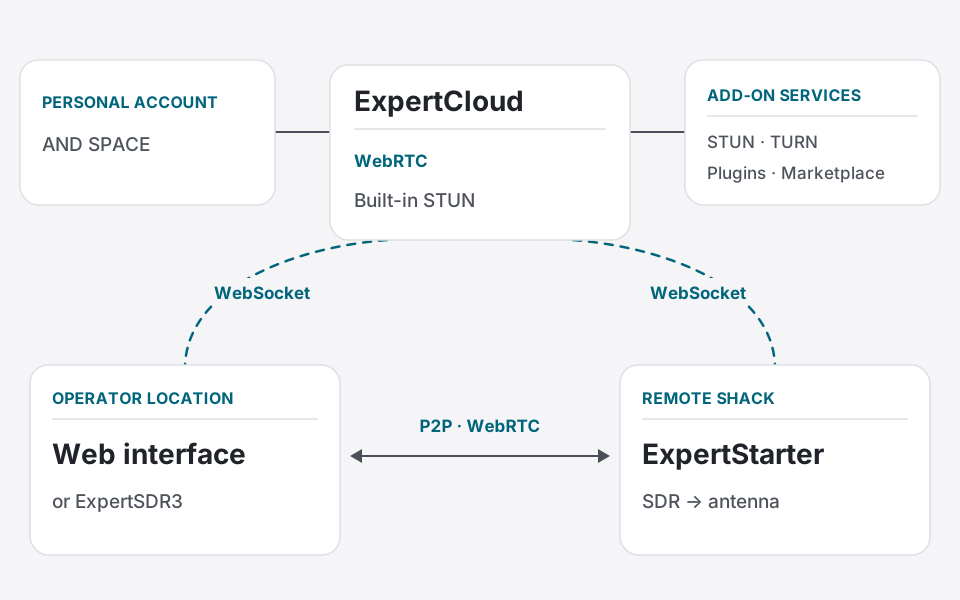
Expert Remote System (ERS) is a remote station control system. ExpertSDR3 is one of its components: the operator application. ExpertStarter runs alongside the SDR equipment at the remote station, while ExpertCloud handles sign-in and connection setup. A web interface is also available.
How ERS works
ExpertCloud: a cloud service for secure sign-in, device management and connection setup between the operator and the remote station.
ExpertStarter: the local server component of ERS. It runs beside the SDR equipment on the same network.
Operator interface: the full ExpertSDR3 application or a browser-based interface.
Benefits of ERS
Eliminates Geographic Barriers: Operate a high-performance station from a location with ideal radio conditions (low noise, excellent propagation) directly from your computer, anywhere in the world.
Enables New Operating Scenarios: Perfect for DX-peditions, contests, extended portable operations, or maintaining your station access while traveling.
Simplifies Station Deployment: Ideal for users who cannot install a full station at their primary residence but have access to a remote site (e.g., a country house).
Who ERS is for
Radio amateurs seeking the highest receive signal quality from low-noise areas.
Operators unable to deploy a full station in an urban environment.
Enthusiasts who frequently travel but wish to stay active in the hobby.
Those who want to evaluate transceiver operation and remote capabilities before purchasing hardware.